Cross-device transfer for every SMS, call and notification you care about.
SMS Forwarder sends incoming SMS, RCS, MMS, calls and app notifications from your Android phone to Telegram, WhatsApp, Email, your PC browser (LAN or private remote link), a webhook (Slack and similar tools included), Bark on iPhone, or another phone via SMS — with multi-channel fanout per rule, automations triggered by time or device state, and offline SMS fallback when Wi-Fi and mobile data both drop. Optional cloud AI on the Advanced tier — built-in (30 ops/day, no API key required) or bring your own Claude / Gemini / OpenAI key — extracts OTPs, summarizes, translates, scores spam, and ships an Ask AI assistant for setup questions.
Every message, every destination, every network.
A focused Android relay built for people who rely on phone-based codes and alerts. Configure once, never miss again.
Seven destinations, all in one app
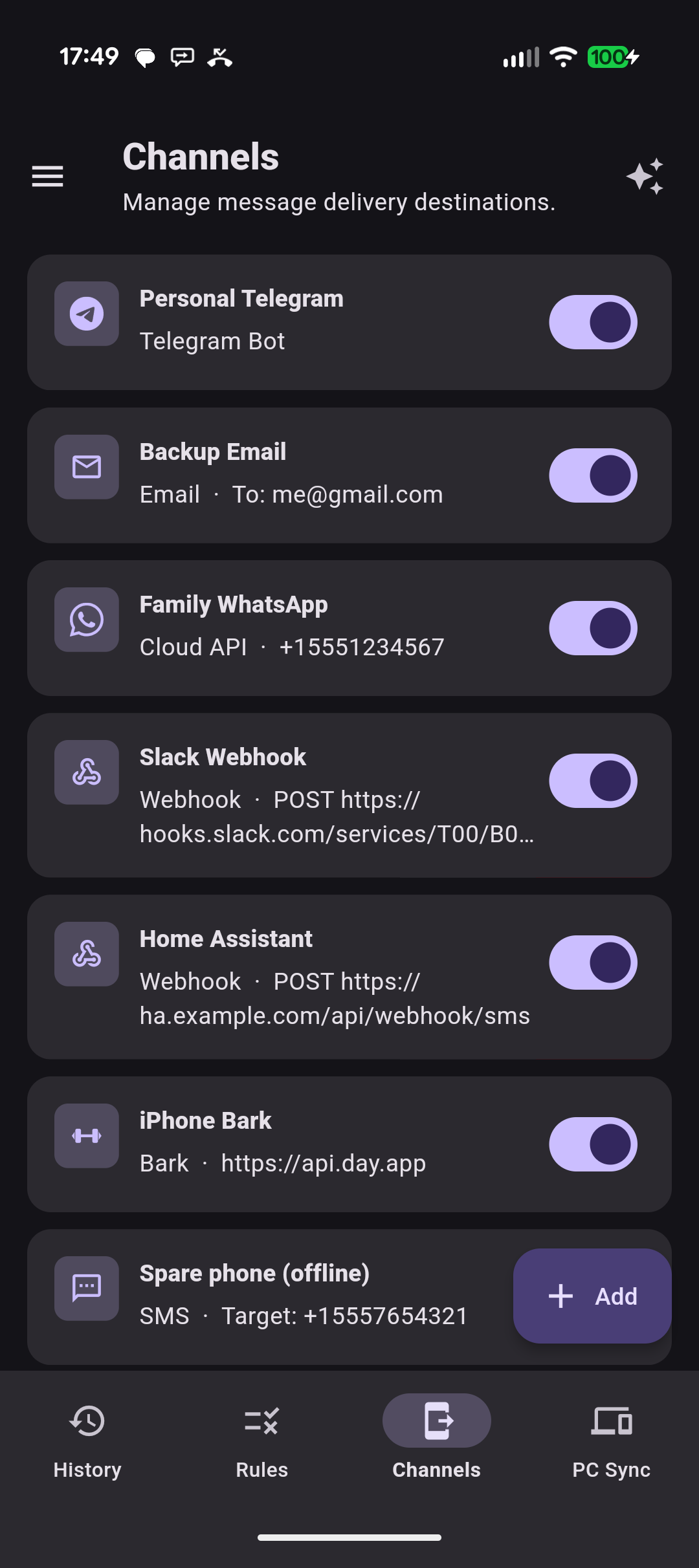
Telegram bots, WhatsApp, Email (your own SMTP server, or the zero-config built-in sender on Advanced), Slack and Home Assistant webhooks (any HTTP endpoint works — Discord, n8n, your own backend), iPhone Bark, and an offline SMS channel to a spare phone. Mix and match per rule; add the PC browser panel and a Google Drive backup target for the full set.
Rules per source — SMS, calls and notifications
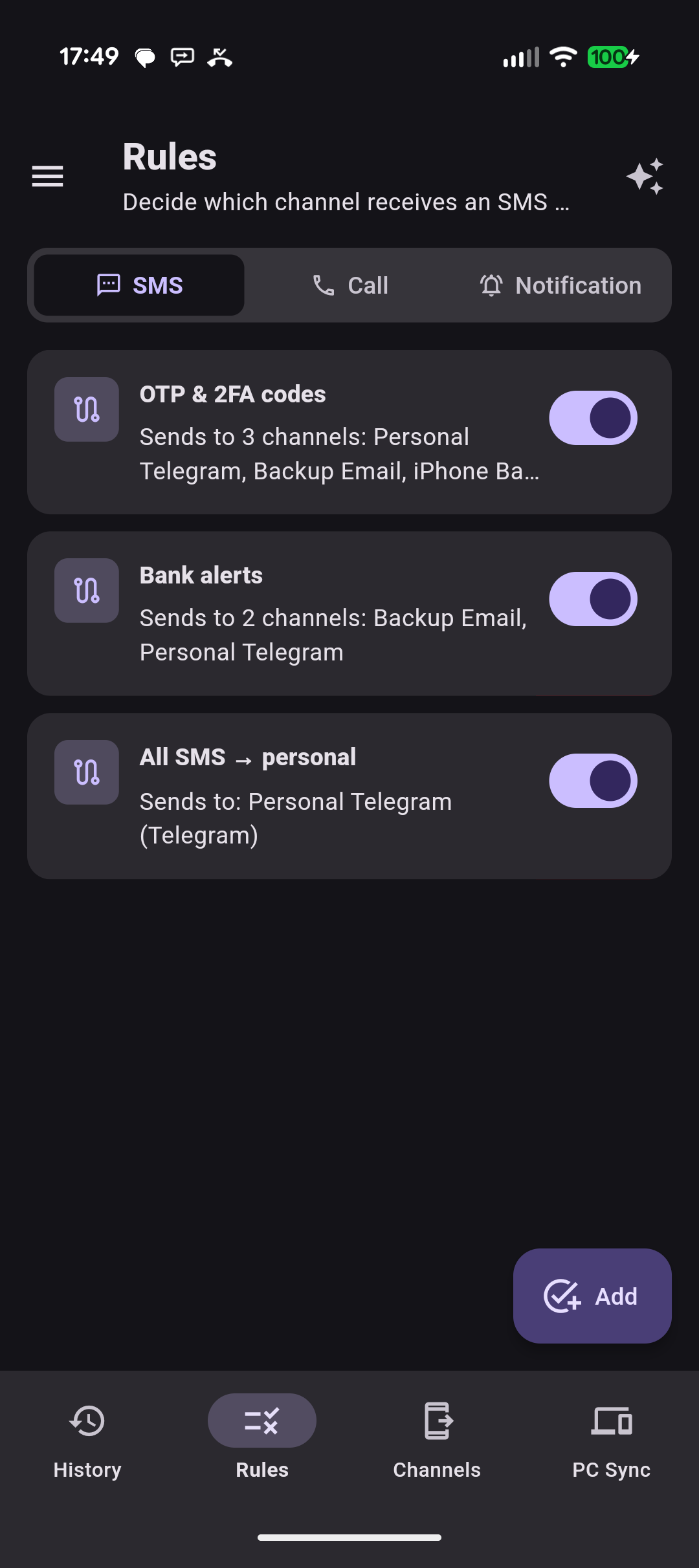
Each source has its own rules tab. A rule names what it catches (OTP & 2FA codes, Bank alerts, All SMS → personal) and shows how many channels it sends to, so the routing reads at a glance. Toggle a rule off to mute that route without deleting it; tap Add to open a fresh rule editor.
Multi-channel fanout with AI tag & spam-score filters
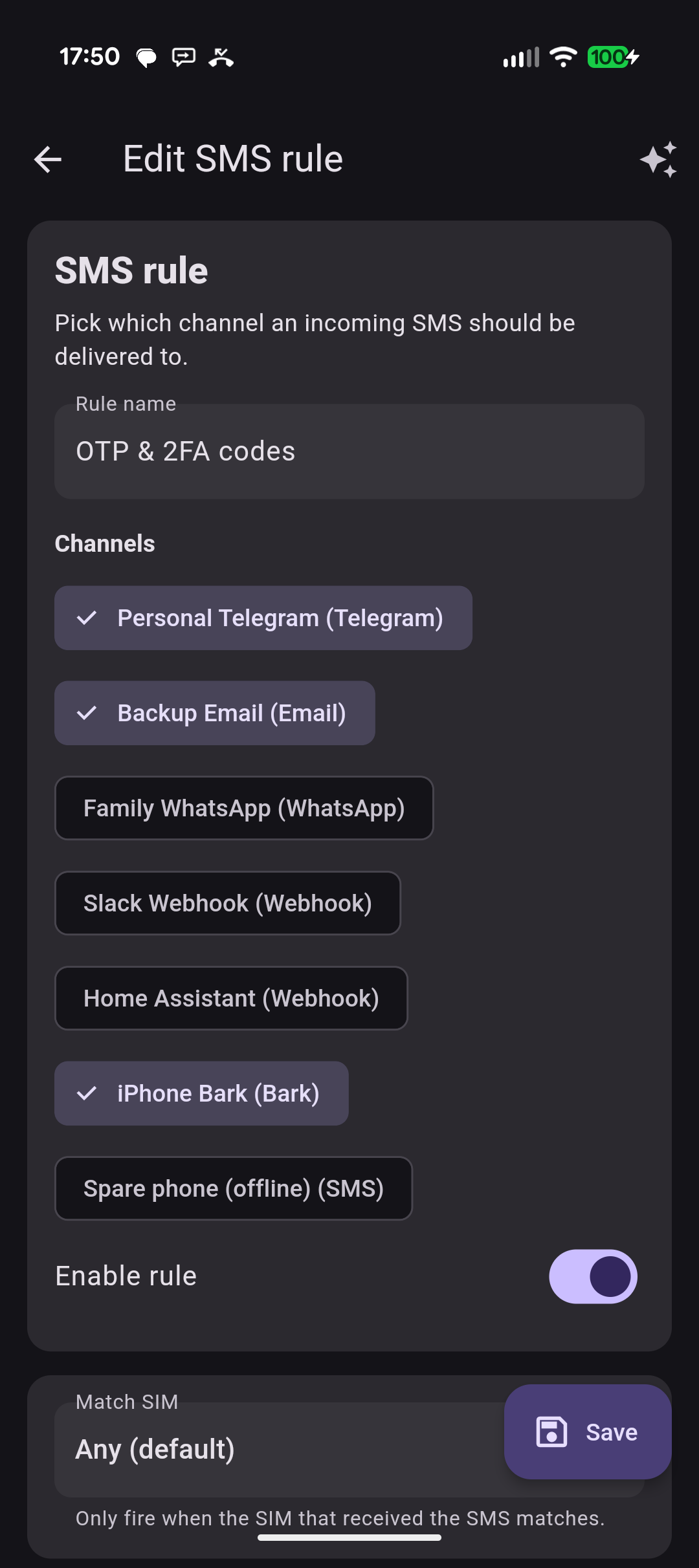
Each rule picks any number of destination channels — pictured: an OTP & 2FA codes rule fanning out to Telegram, Email and Bark in one go, bound to any SIM. Narrow with content or sender filters; on Advanced, AI tag and spam-score filters route by intent. Templates support placeholders like {{from}}, {{ai_otp}} and {{ai_summary}}.
PC browser inbox — LAN or private remote link
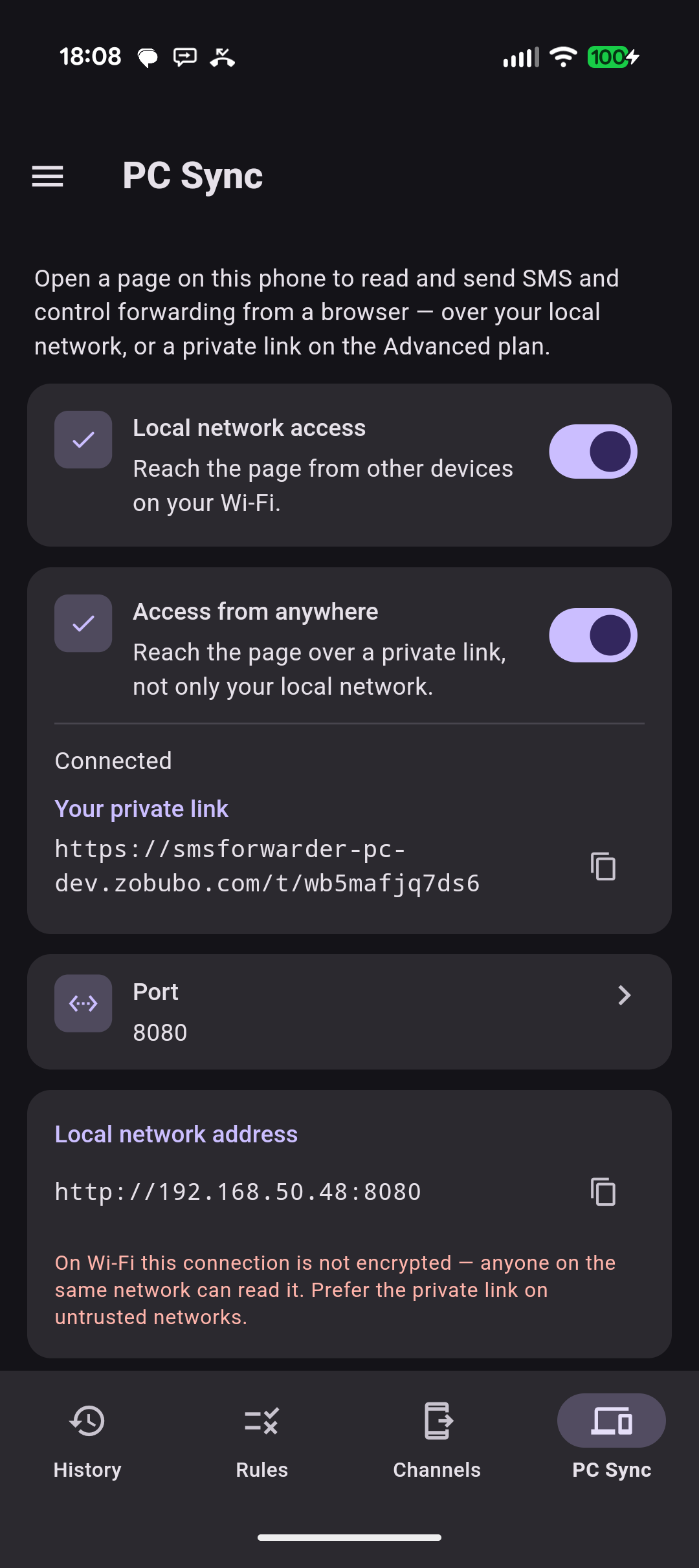
Two independent switches. "Local network access" opens a browser panel to any device sharing your Wi-Fi. "Access from anywhere" (Advanced) hands you a private remote link that works on any network — pictured here, alongside the local Wi-Fi address. The panel itself reads SMS / call / notification history, sends SMS and flips rule switches.
Telegram bots, WhatsApp, Email (your own SMTP server, or the zero-config built-in sender on Advanced), Slack and Home Assistant webhooks (any HTTP endpoint works — Discord, n8n, your own backend), iPhone Bark, and an offline SMS channel to a spare phone. Mix and match per rule; add the PC browser panel and a Google Drive backup target for the full set.
Each source has its own rules tab. A rule names what it catches (OTP & 2FA codes, Bank alerts, All SMS → personal) and shows how many channels it sends to, so the routing reads at a glance. Toggle a rule off to mute that route without deleting it; tap Add to open a fresh rule editor.
Each rule picks any number of destination channels — pictured: an OTP & 2FA codes rule fanning out to Telegram, Email and Bark in one go, bound to any SIM. Narrow with content or sender filters; on Advanced, AI tag and spam-score filters route by intent. Templates support placeholders like {{from}}, {{ai_otp}} and {{ai_summary}}.
Two independent switches. "Local network access" opens a browser panel to any device sharing your Wi-Fi. "Access from anywhere" (Advanced) hands you a private remote link that works on any network — pictured here, alongside the local Wi-Fi address. The panel itself reads SMS / call / notification history, sends SMS and flips rule switches.
Built for people who can't afford to miss an SMS.
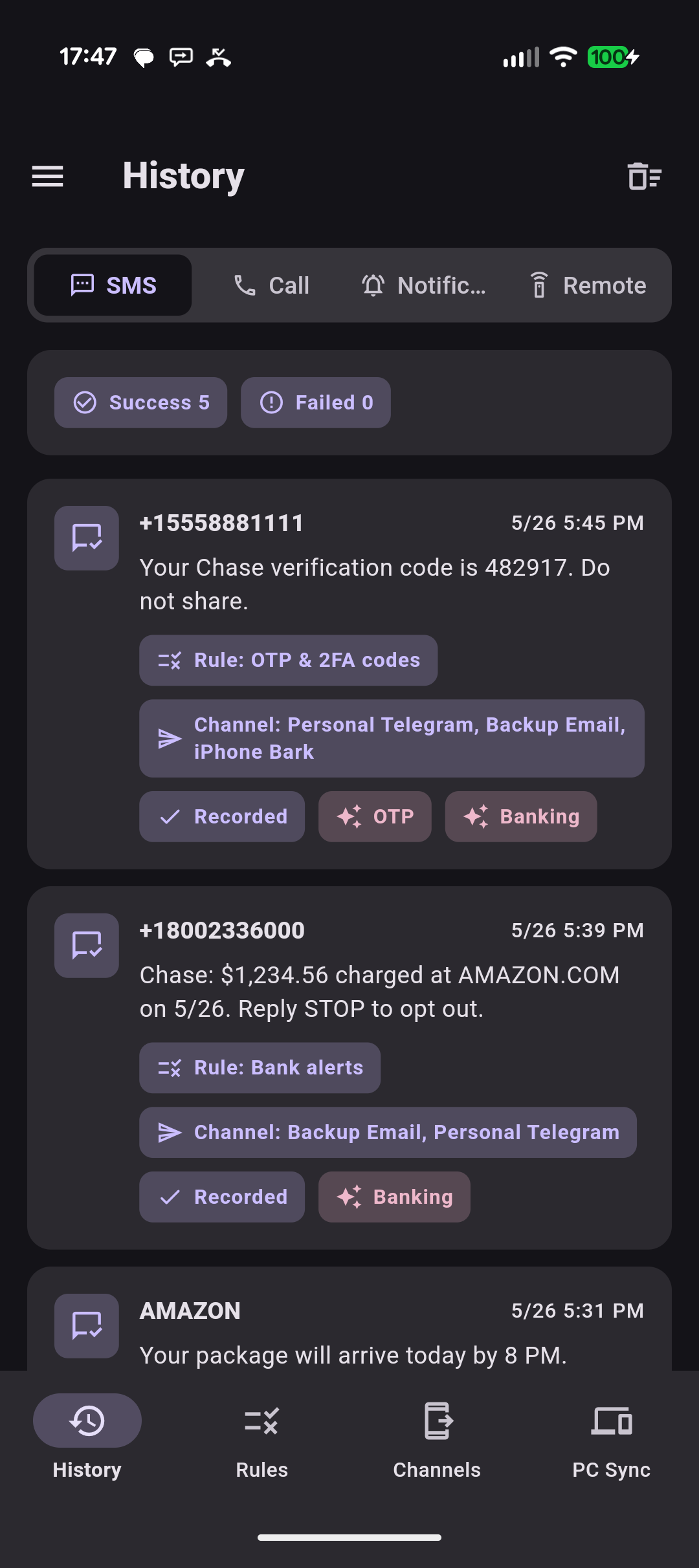
Bank OTPs, two-factor codes, parcel notifications, app alerts — relayed to the channels you already check.
Buy Basic once. Add AI any time.
Two tiers. Basic is a one-time purchase that unlocks every channel, every rule and automations — no subscription, no auto-renewal. Advanced is a subscription that adds cloud AI and zero-config built-in email — built-in AI (30 ops/day) or bring your own LLM key.
Basic
$2.99 one-time
A one-time purchase — no subscription, no auto-renewal. Unlimited forwarding to every channel, with rules, automations, templates and remote control.
A subscription with everything in Basic, plus cloud AI and zero-config built-in email — for OTPs, summaries, translation, classification and spam scoring.
Everything in Basic
Built-in cloud AI: 30 operations / day, no API key required
Or bring your own key: Claude, Gemini, OpenAI
Zero-config built-in email — no SMTP server to set up
Auto OTP extraction as {{ai_otp}}
Summary, translation, smart tags, spam score
Ask AI assistant: multi-turn chat, history and its own daily quota
Natural-language remote command (#AI)
Private web link for remote access beyond your LAN
AI-aware rule filters (route by tag or spam score)

 Basic
Basic